
How to Register for FBR Tajir Dost Scheme
Running a retail business or shop in Pakistan used to mean staying completely off the regulatory radar. For decades, the country’s massive informal economy operated parallel to the official tax system, driven by a combination of complex paperwork and institutional distrust (Shahzad, 2026). However, the Federal Board of Revenue (FBR) has shifted its strategy entirely, replacing aggressive audits with streamlined, mobile-first documentation.
If you are a shopkeeper, wholesaler, retailer, or distributor, you have likely heard about the sweeping initiative to document commercial markets. This comprehensive guide walks you through exactly how to register for the FBR Tajir Dost Scheme online in 2026 using your smartphone or laptop, helping you secure your business and avoid heavy penalties.
Table of Contents
Understanding the FBR Tajir Dost Scheme
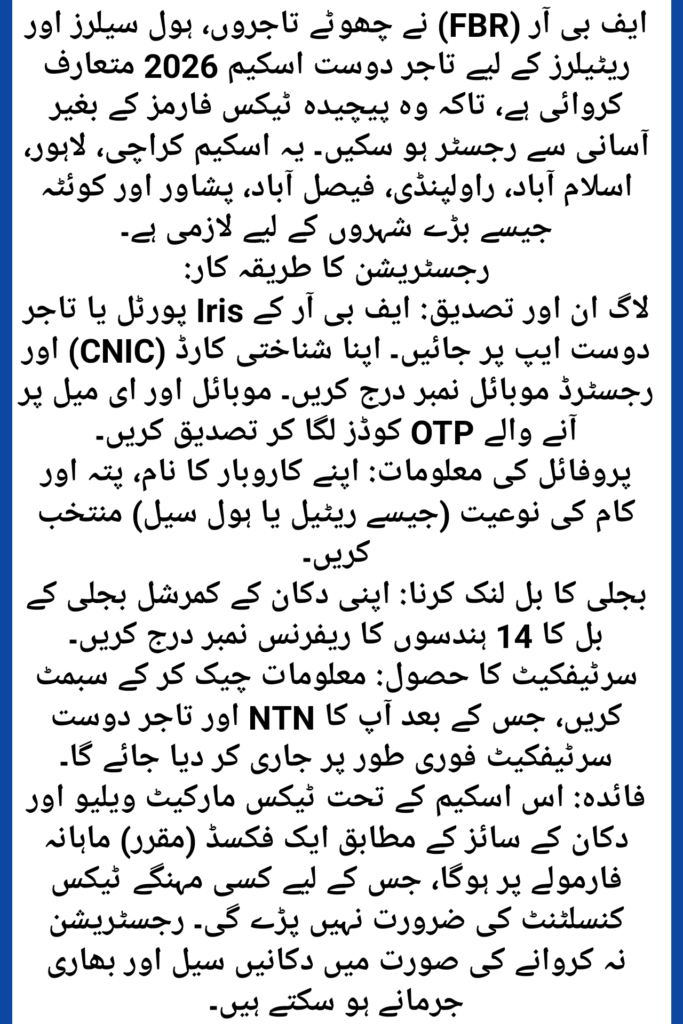
The Tajir Dost Scheme is a targeted documentation drive designed specifically to bring tier-1 and tier-2 retailers, wholesalers, and small-scale traders into the formal tax net. Instead of forcing small business owners to deal with traditional Income Tax Returns, the FBR introduced a simplified, fixed tax regime tied to the commercial value and location of your shop.
Recent economic studies highlight that digital tax administration tools, like the Tajir Dost Scheme and integrated Point of Sale (POS) systems, are intentionally designed to reduce compliance costs and eliminate the traditional “tax aversion” felt by small business owners (Shahzad, 2026). By establishing a clear, traceable digital footprint, registered traders protect their businesses from sudden closures while unlocking access to formal bank loans and commercial credit lines.
Who is Required to Register under the Scheme?
The initiative applies to any individual or entity operating a fixed place of business within specified commercial zones. This includes:
- Wholesalers and bulk distributors
- Retailers and departmental store owners
- Parts suppliers and hardware dealers
- Small shopkeepers operating in major urban markets
Cities Covered in the Initial Implementation
The enforcement began across Pakistan’s major economic hubs before scaling nationwide. If your business operates in any of the following cities, registration is mandatory:
- Karachi
- Lahore
- Islamabad
- Rawalpindi
- Faisalabad
- Peshawar
- Quetta
Prerequisites for Online FBR Tax Registration
Before firing up the FBR online portal, gather your business documentation. Having these details ready prevents session timeouts and errors on the official server.
Basic Documents Needed for Small Business Owners
- Valid CNIC: The 13-digit National Identity Card number of the business owner.
- Biometric Mobile Number: A mobile SIM registered strictly against the owner’s CNIC. This is vital because the FBR sends one-time passwords (OTPs) to this number to verify identity.
- Clean Electricity Bill: The most recent paid commercial electricity bill for the shop or warehouse, which contains your unique 14-digit electricity reference number.
Essential Business Details Required
- Business Structure Name: The exact trade name displayed on your shop board or invoice.
- Exact Commercial Address: The shop number, street name, market area, and city.
- Property Ownership Status: Information confirming whether you own the shop space or lease it under a commercial rental agreement.
Step-by-Step Guide to Register for FBR Tajir Dost Scheme Online 2026
The FBR has integrated the Tajir Dost module directly into its primary digital platforms. You can complete this entire workflow via a computer browser or through the official Tajir Dost Mobile App available on the Google Play Store and Apple App Store.
1.Access the Iris Portal or Download the App:Step 1: System Entry.
Open your web browser and navigate to the official FBR Iris portal (iris.fbr.gov.pk). Alternatively, open the Tajir Dost App on your smartphone. If you are an unregistered user, click on the ‘Registration for Unregistered Person’ or ‘Tajir Dost Registration’ tab on the home screen.
2.Verify Your CNIC and Mobile Number:Step 2: Identity Authentication.
Enter your 13-digit CNIC number without dashes. Input your mobile phone number (ensure it matches the network provider registered to your CNIC). The system will instantly dispatch two separate One-Time Passwords (OTPs) one to your mobile number and one to your email address. Enter both codes to verify your identity.
3.Fill Out the Business Information Profile:Step 3: Business Details.
Once logged into the simplified Tajir Dost wizard, enter your official business name. Select your primary business activity from the dropdown menu (e.g., Retail, Wholesale, Grocery). Input your shop’s exact physical address, ensuring the city and specific commercial market match your local trade union records.
4.Link Your Commercial Utility Connection:Step 4: Utility Mapping.
Locate the 14-digit reference number on your shop’s commercial electricity bill. Input this number into the utility section. The FBR system cross-references this data with power distribution companies (like K-Electric, LESCO, or IESCO) to assess the geographic location and size category of your business premises.
5.Review, Submit, and Fetch Your NTN:Step 5: Final Submission.
Double-check all fields for spelling or positional errors. Click ‘Submit’. The system will process the form and automatically generate your National Tax Number (NTN) alongside a unique Tajir Dost Certificate. You can download and print this certificate immediately.
The Fixed Tax Structure
The core appeal of this initiative is the removal of unpredictable tax assessments. The FBR utilizes a clear matrix to determine your monthly payment, removing the need to hire expensive tax consultants.
How is the Monthly Fixed Tax Calculated?
Your tax rate is calculated using a predetermined valuation formula based on three core factors:
- The market value of the commercial property.
- The specific city and commercial zone where the shop is located.
- The size and category of the retail or wholesale outlet.
What happens if I do not register my business?
Ignoring the registration deadline triggers automatic enforcement actions. The FBR has the legal authority to issue administrative fines, seal non-compliant retail shops, and impose higher, penalizing withholding tax rates on your commercial electricity bills and banking transactions.
Post-Registration Compliance and Benefits
Completing your online registration is the first step toward building a sustainable, fully documented business. Operating within the formal tax net brings immediate financial advantages.
Filing Simplified Monthly or Quarterly Returns
Registered traders are not required to file complex, 20-page annual income tax wealth statements. Instead, you simply verify your fixed monthly liability via the mobile app or web portal and pay it using a computer-generated Payment Slip ID (PSID) at any commercial bank branch or via mobile banking apps.
Frequently Asked Questions
Is the Tajir Dost Scheme separate from standard NTN registration?
Yes, it is a simplified, dedicated pathway designed for small traders. However, completing this process automatically registers your business with the FBR and issues a valid National Tax Number (NTN) tied to your commercial activity.
Can a salaried individual with a side business join this scheme?
The scheme is explicitly tailored for retail and wholesale businesses operating out of physical commercial spaces. If your side business involves a physical shop or commercial outlet, that specific retail entity must be registered under this program.
What should I do if my mobile number fails OTP verification?
Ensure that the mobile SIM card is registered directly under the same CNIC you entered on the FBR portal. If the SIM is registered to a family member, the security system will block the verification request to protect against identity theft.
How do I correct an error after submitting my application?
If you make a mistake regarding your shop address or business name, log back into the Iris portal, navigate to your active profile modification section, update the incorrect fields, and submit a revision request.
Summary of the Registration Process
| Phase | Core Action Required | Estimated Time |
| Phase 1: Verification | Enter CNIC and verify matching mobile OTP codes | 3 Minutes |
| Phase 2: Profiling | Input trade name, exact shop address, and commercial type | 5 Minutes |
| Phase 3: Integration | Provide the 14-digit electricity bill reference number | 2 Minutes |
| Phase 4: Issuance | Review data, click submit, and print the digital certificate | 2 Minutes |
Taking your business digital doesn’t just keep the regulators happy—it protects your livelihood and sets your shop up for future financial growth. Grab your commercial electricity bill, open up the Iris portal, and complete your registration today to secure your operations.
References
Shahzad, K. (2026). Digital Finance, Tax Aversion, Institutional Trust, and the Informal Economy: Evidence from Enterprises of Quetta City. Research Journal for Social Affairs, 4(1), 163–173.